AVG Internet Security 2011 salah satu Antivirus yang cukup handal yang akan memberikan semua perlindungan secara Online, sehingga sampeyan tidak akan perlu khawatir tentang segala macam serangan seperti pencurian identitas, virus, bahkan mengunjungi situs berbahaya.
Apabila seorang Bankir, atow membuka sebuah toko Online maka solusinya sudah anda dapatkan untuk melindungi aset anda.secara real-time.
Great Features:
- Shop and bank with confidenceAVG Identity Protection™ and AVG Firewall (enhanced for AVG 2011)
- Keep tough threats outAVG Anti-Virus, AVG Anti-Spyware, AVG Protective Cloud Technology and AVG Community Protection Network
- Block spammers and scammersAVG Anti-Spam
Marks all unwanted emails as spam, protecting you from online scams and keeping your inbox clutter free.
- Download, share files and chat safelyAVG Online Shield™
Download and share files without risk of infection. You are also protected when you exchange files through online chat.
- Stay protected on social networksAVG Social Networking Protection
Automatically checks links exchanged on Facebook and MySpace in real time so that you and your friends stay safe. NEW!
- Support and assistance
Our technical experts are available to help with any problems you might have.
- Scan smarter and fasterAVG Smart Scanning works while you play
AVG 2011’s scans are 3 times faster than previous versions. AVG Smart Scanning works while you’re away and runs in low-priority mode when you return.
System Requirements:
-Memory-512 MB of RAM
-Hard disk free space (for installation)-750 MB
-Processor-Intel Pentium 1.8 GHz or faster
-Memory-512 MB RAM
-Hard disk free space (for installation)-1400 MB
-Windows XP\ Windows Vista\ Windows 7
- Download AVG Internet Security 2011.Build 10.0.1325 (32-Bit) (165.45 MB) - Hotfile
- Download AVG Internet Security 2011.Build 10.0.1325 (64-Bit) (186.29 MB) – Hotfile
CARA INSTALLASI:
1. Matikan koneksi internet > Install programnya > klik Accept
2. Ganti Serialnya dengan Serial yang ada > klik Next

3. Pilih Quick Install > lalu Next
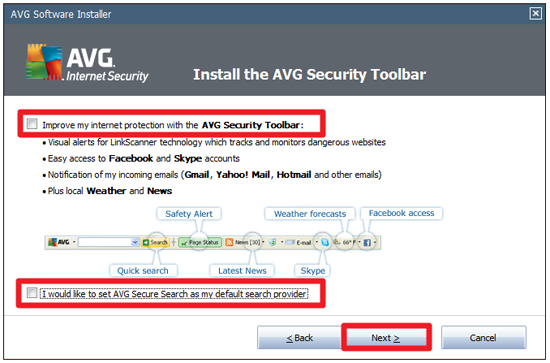
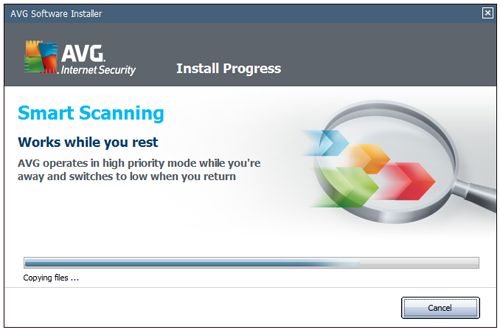
4. Hilangkan semua Centang > klik Next > lalu tunggu sampe finish > Restart Now

5. Buka AVG Internet Security 2011 > dan lihat pojok kiri AVG anda akan habis sampe tanggal 26 Feb 2018

6. Jalankan koneksi Internet anda untuk Update Online > klik Update Now
dan lihatlah statusnya belum ter-Protect semuanya > tunggu sampe finish Update > Restart Now

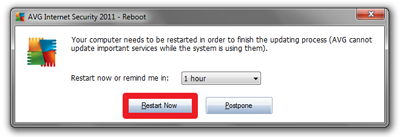
7. Buka AVG Internet Security 2011 > sekarang anda sudah ter-Protect semuanya
mulailah Scan komputer anda agar terbebas dari virus jahat

CARA MEMATIKAN AUTOMATIC UPDATE:
Mendisable automatic update, Karena bagi sebagian orang, hal ini menganggu kecepatan koneksi internet kita disebabkan usaha antivirus ini untuk mengupdate database antivirusnya mendownload pembaharuan dengan ukuran yang cukup besar.
1. Buka AVG Internet Security 2011 > Pada Overview klik kanan Update Manager pilih Open

2. Klik Tool / Advanced Settings > pilih Schedules > Scheduled scan > Schedule settings
Hapus Centang Enable this task
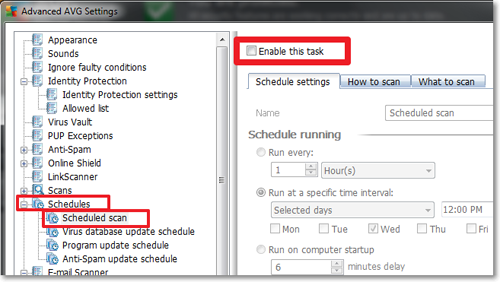
3. Pilih Virus database update schedule > Hapus Centang Enable this task
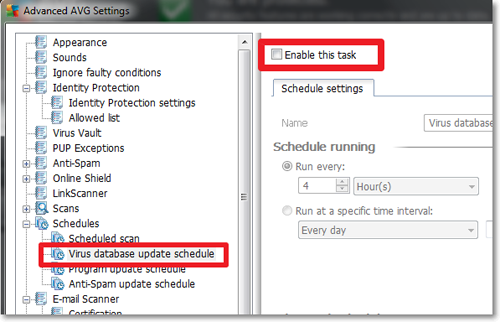
4. Lakukan hal yang sama pada: Program update schedule dan Anti-Spam update schedule
terakhir klik Apply lalu OK
Selesai sudah bos…and don’t forget your comment lho


Tidak ada komentar:
Posting Komentar